
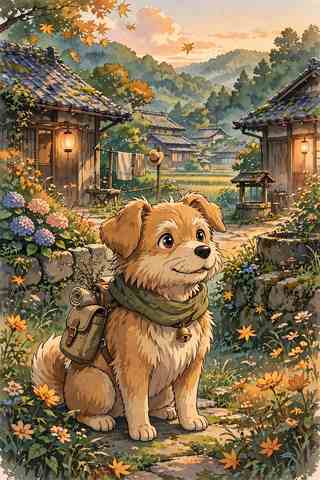
Introduction
Some art styles impress you. Studio Ghibli’s style embraces you. The soft watercolor skies, the lovingly painted bowls of ramen steam, the way even a quiet bus stop in the rain feels full of meaning — that is the magic millions of fans fell in love with. Now you can wrap your own photograph in that same warmth. This Ghibli AI photo prompt reimagines you as a person with their loyal dog, keeping your real face while everything around you becomes pure Miyazaki.
What makes this particular prompt so shareable is how personal it feels. You are not pasted onto a random anime background. The scene is built around the idea of a person with their loyal dog — a shiba-like dog, a loose leash, a country lane with wildflowers along the path. Every detail, from a wooden fence to golden evening light, is described in the prompt so the AI paints a coherent little world instead of a generic filter. The result looks like a still from a film that was always about you.
And the best part? You do not need drawing skills, expensive software or hours of editing. If you can copy and paste a sentence, you can make this portrait. In the next sections you will find the exact prompt in a copy-ready block, a breakdown of why each line of it works, step-by-step usage instructions for any AI image tool, pro tips for the most flattering results, and answers to the questions everyone asks before trying it. Let us turn your photo into loyal and heartwarming Ghibli magic.
The Prompt
Here is the exact prompt. Copy everything inside the box below and paste it into your favorite AI image generator along with your photo. Do not change the wording on your first try — it is tuned so the AI keeps your face recognizable while rebuilding the world as a country lane.
Transform my photo into a Studio Ghibli anime portrait of a person with their loyal dog, keeping my exact face, hairstyle and happy expression. Show me walking a shiba-like dog on a country lane with wildflowers along the path, a wooden fence and golden evening light, the dog looking up at me with devotion. Use soft cel shading, warm heartwarming colors, charming hand-painted countryside and the loyal friendship of a Ghibli animal companion. Portrait orientation, highly detailed anime illustration.
Notice how the prompt does three jobs at once: it locks in your identity (“keeping my exact face”), it art-directs the scene (a shiba-like dog, wildflowers along the path), and it sets the rendering style (soft cel shading, hand-painted details). That three-part structure is what makes it reliable across different AI tools.
Why This Prompt Works
It protects your likeness. Most anime filters happily replace your face with a generic one. This prompt explicitly instructs the AI to keep your exact face, hairstyle and expression, so friends still recognize you instantly. The Ghibli magic happens around you — in the clothing, the light and the painted background — not by erasing who you are.
It art-directs a complete scene. Rather than saying “Ghibli style” and hoping for the best, the prompt describes a country lane with tangible props: a shiba-like dog, a loose leash and wildflowers along the path. AI generators follow concrete nouns far better than vague adjectives, which is why the output looks composed and cinematic instead of random.
It speaks Ghibli’s visual language. Phrases like “soft cel shading,” “hand-painted background details” and a “loyal and heartwarming” mood map directly to how Studio Ghibli films actually look — gentle gradients, loving detail in everyday objects, and emotion carried by light. The finishing line “highly detailed anime illustration” pushes the renderer toward quality instead of a quick sketch.
It is built to be shared. Portraits of a person with their loyal dog in a loyal and heartwarming setting trigger exactly the nostalgia and wonder that make people comment, save and repost. Small storytelling details like a wooden fence and golden evening light give viewers something to discover on the second look, which is the secret ingredient of every viral Ghibli portrait.
How to Use This Prompt
Step 1 — Pick a good source photo: Choose a clear, front-facing photo with good lighting and a simple background. The AI keeps your facial features, so a sharp original gives the sharpest anime you. Avoid heavy filters or sunglasses.
Step 2 — Copy the prompt: Scroll up to the box under “The Prompt” and copy the entire text exactly as written. It was tuned as a unit, so keep every sentence for your first attempt.
Step 3 — Open your AI image tool: This works in Midjourney, DALL-E, Gemini, Leonardo, Firefly and most modern generators. Upload your photo first, then paste the prompt into the text field alongside it.
Step 4 — Generate and compare: Create two or three variations. Look for the one where your face is most recognizable and the scene of a person with their loyal dog feels most alive. Small differences between runs are normal.
Step 5 — Save and share: Download the highest-resolution version, and consider a light upscale for printing. Post it with Ghibli hashtags and watch fellow fans react.
Pro Tips for Best Results
Use a sharp, front-facing photo. The prompt preserves your exact face, but it can only preserve what it can see. A clear photo with even lighting gives the AI the most to work with.
Keep the prompt intact on round one. Details like a shiba-like dog and wildflowers along the path were balanced against each other. Change one thing at a time afterward so you learn what each clause does.
Ask for portrait orientation explicitly if needed. The prompt already requests it, but some tools default to square — add “vertical 3:4” to the end if your generator ignores the orientation cue.
Regenerate for background variety. Your face stays consistent while backgrounds like a wooden fence and golden evening light remix between runs. Three generations usually surface one clear winner.
Finish with a gentle upscale. AI portraits sharpen beautifully. A light 2x upscale makes the hand-painted background details — a loose leash especially — look stunning in print or as a wallpaper.
Frequently Asked Questions
Will this prompt really keep my face looking like me?
Yes — that is the prompt’s first instruction. It tells the AI to preserve your exact face, hairstyle and expression while transforming you into a person with their loyal dog. For the strongest likeness, start with a clear, front-facing, well-lit photo and avoid heavy makeup filters on the source image.
Which AI image tools work with this prompt?
All major ones: Midjourney, DALL-E, Google Gemini, Leonardo AI, Adobe Firefly and similar generators. Any tool that accepts an uploaded reference photo plus a text prompt will work. If your tool has an image-strength or creativity slider, keep it in the middle so your face stays faithful while the loyal and heartwarming Ghibli scene shines.
Can I customize details like a shiba-like dog?
Absolutely. After your first successful generation, swap individual details to taste — change a shiba-like dog to something personal, or adjust the setting while keeping wildflowers along the path. Change one element at a time so you can see exactly what each edit does to the final portrait.
Is the prompt free to use, and can I share my result?
The prompt itself is completely free — copy it, remix it and use it as often as you like. Most AI tools offer free tiers or trial credits, so your first portraits may cost nothing at all. Your generated portrait is yours to share; posting it with Ghibli and AI art hashtags is a great way to join the trend.
Your photo already holds a story — this prompt simply retells it the way Studio Ghibli would, with soft light, hand-painted detail and a loyal and heartwarming heart. Copy the prompt, keep your face front and center, and let a country lane become your own little film still. When your portrait is ready, share it proudly: the world can always use one more moment of Ghibli magic.
Related Viral Prompts
#GhibliAI #AIPhotoPrompt #StudioGhibli #DogCompanion #PromptBazar




Leave a Reply