
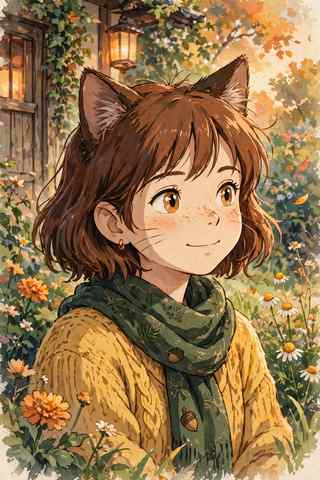
Introduction
Scroll through any social feed this year and you will spot them instantly: ordinary selfies reborn as luminous Studio Ghibli portraits, each one glowing with hand-painted charm. The trend shows no sign of slowing down, because unlike most filters, the Ghibli look tells a story. This free Ghibli AI photo prompt was crafted to tell yours — transforming your picture into a playful cat girl in a scene that feels lifted from a beloved anime film.
The secret is specificity. Instead of a vague instruction like “make me anime,” the prompt directs the AI with concrete imagery: soft cat ears and a tail, a striped dress, and the atmosphere of a cozy bakery rooftop. It asks for a warm loaf of bread held close plus small storytelling touches such as pigeons pecking crumbs and a pink sunset sky. Those details are what separate a flat cartoon effect from a portrait that makes people stop scrolling and ask how you made it.
You do not need any technical background to use it. The full prompt is waiting below in a ready-to-copy block, followed by a plain-English explanation of why it works so well, simple steps for every major AI image generator, professional tips for the best possible likeness, and a short FAQ. By the end of this guide, your camera roll will have its own playful and cozy Ghibli moment.
The Prompt
Here is the exact prompt. Copy everything inside the box below and paste it into your favorite AI image generator along with your photo. Do not change the wording on your first try — it is tuned so the AI keeps your face recognizable while rebuilding the world as a cozy bakery rooftop.
Transform my photo into a Studio Ghibli anime portrait of a playful cat girl, keeping my exact face, hairstyle and mischievous smile. Give me soft cat ears and a swishing tail, dressed in a striped dress, sitting on a cozy bakery rooftop holding a warm loaf of bread while pigeons peck crumbs under a pink sunset sky. Use soft cel shading, cozy warm tones, lively playful energy and the charming whimsy of a Ghibli heroine. Portrait orientation, highly detailed anime illustration.
Notice how the prompt does three jobs at once: it locks in your identity (“keeping my exact face”), it art-directs the scene (soft cat ears and a tail, a warm loaf of bread held close), and it sets the rendering style (soft cel shading, hand-painted details). That three-part structure is what makes it reliable across different AI tools.
Why This Prompt Works
Identity comes first. The opening instruction — keeping your exact face, hairstyle and expression — anchors the whole generation. Everything Ghibli-flavored that follows, from the costume to a cozy bakery rooftop, is painted around a face that stays unmistakably yours. That is why this prompt beats one-tap anime filters that turn everyone into the same character.
Concrete details beat adjectives. Compare “make it Ghibli” with this prompt’s direction: soft cat ears and a tail, a striped dress, a warm loaf of bread held close. Specific objects give the AI something to draw, and drawn things look intentional. The background stops being wallpaper and starts being a place — a cozy bakery rooftop you can almost step into.
Mood is engineered, not hoped for. By naming a playful and cozy mood and pairing it with soft cel shading and hand-painted detail, the prompt controls the emotional temperature of the image. Ghibli films are masters of feeling — a quiet afternoon can feel epic — and this prompt borrows that exact technique for your portrait.
Finishing touches do the heavy lifting. Little elements like pigeons pecking crumbs and a pink sunset sky might seem decorative, but they are what viewers remember and mention. They add the lived-in richness of real Ghibli background art, turning a nice portrait into one people screenshot and share.
How to Use This Prompt
Step 1 — Start with a clean portrait: A well-lit, front-facing photo works best. The prompt instructs the AI to preserve your exact face, so feed it a photo where your features are clearly visible.
Step 2 — Copy the full prompt text: Use the ready-made block above. Copy it word for word the first time; you can experiment with tweaks after you see a result you like.
Step 3 — Pair photo with prompt: In your chosen AI generator — Midjourney, DALL-E, Gemini, Leonardo or similar — upload the photo and paste the prompt. Make sure the tool is in image-edit or image-reference mode if it has one.
Step 4 — Review the variations: Generate a few options and pick the portrait where you are instantly recognizable as a playful cat girl. The background details will vary slightly each run, which is part of the fun.
Step 5 — Polish and post: Save the best version at full resolution. It makes a wonderful profile picture, a printed gift, or a post your followers will love.
Pro Tips for Best Results
Use a sharp, front-facing photo. The prompt preserves your exact face, but it can only preserve what it can see. A clear photo with even lighting gives the AI the most to work with.
Keep the prompt intact on round one. Details like soft cat ears and a tail and a warm loaf of bread held close were balanced against each other. Change one thing at a time afterward so you learn what each clause does.
Ask for portrait orientation explicitly if needed. The prompt already requests it, but some tools default to square — add “vertical 3:4” to the end if your generator ignores the orientation cue.
Regenerate for background variety. Your face stays consistent while backgrounds like pigeons pecking crumbs and a pink sunset sky remix between runs. Three generations usually surface one clear winner.
Finish with a gentle upscale. AI portraits sharpen beautifully. A light 2x upscale makes the hand-painted background details — a striped dress especially — look stunning in print or as a wallpaper.
Frequently Asked Questions
Will this prompt really keep my face looking like me?
Yes — that is the prompt’s first instruction. It tells the AI to preserve your exact face, hairstyle and expression while transforming you into a playful cat girl. For the strongest likeness, start with a clear, front-facing, well-lit photo and avoid heavy makeup filters on the source image.
Which AI image tools work with this prompt?
All major ones: Midjourney, DALL-E, Google Gemini, Leonardo AI, Adobe Firefly and similar generators. Any tool that accepts an uploaded reference photo plus a text prompt will work. If your tool has an image-strength or creativity slider, keep it in the middle so your face stays faithful while the playful and cozy Ghibli scene shines.
Can I customize details like soft cat ears and a tail?
Absolutely. After your first successful generation, swap individual details to taste — change soft cat ears and a tail to something personal, or adjust the setting while keeping a warm loaf of bread held close. Change one element at a time so you can see exactly what each edit does to the final portrait.
Is the prompt free to use, and can I share my result?
The prompt itself is completely free — copy it, remix it and use it as often as you like. Most AI tools offer free tiers or trial credits, so your first portraits may cost nothing at all. Your generated portrait is yours to share; posting it with Ghibli and AI art hashtags is a great way to join the trend.
Your photo already holds a story — this prompt simply retells it the way Studio Ghibli would, with soft light, hand-painted detail and a playful and cozy heart. Copy the prompt, keep your face front and center, and let a cozy bakery rooftop become your own little film still. When your portrait is ready, share it proudly: the world can always use one more moment of Ghibli magic.
Related Viral Prompts
#GhibliAI #AIPhotoPrompt #StudioGhibli #CatGirl #PromptBazar




Leave a Reply