
Introduction
Few art styles stir the heart the way Studio Ghibli’s hand-painted worlds do. The glowing skies, the rustling forests, the tiny details in every background — from a kettle steaming on a stove to clouds drifting over green hills — all of it feels alive. Ghibli films remind us that ordinary moments can be magical, and that is exactly why turning your own photo into a Ghibli-style portrait feels so special.
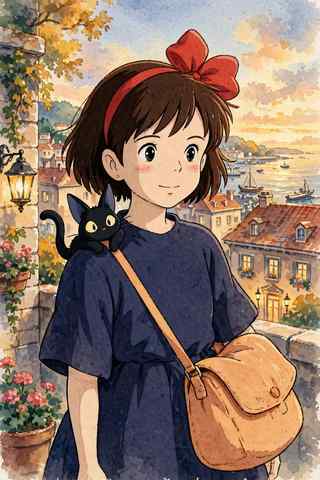
With this Kiki’s Delivery Service Witch Ghibli AI photo prompt, you can step straight into that painted universe. As a young witch soaring over a seaside town on a broomstick at golden hour Surrounded by a big red bow, a wooden broomstick, and circling seagulls, your portrait keeps your real face, your real smile, your real identity — only the world around you changes, brushed in soft watercolor and delicate anime line art. The result looks like a still frame from a film you have always loved.
People are sharing these dreamy anime portraits everywhere right now, from profile pictures to printed wall art. In this guide you will get the exact copy-paste prompt, a clear explanation of why it works so well, step-by-step usage instructions, pro tips for the best results, and answers to the most common questions. By the end, you will be ready to create your own bright and hopeful Ghibli portrait in under a minute.
The Prompt
Copy the exact prompt below and paste it into your favorite AI image generator along with your photo:
Transform this photo into a Studio Ghibli style anime portrait, keeping the exact face, expression and identity of the person. Place the subject in a scene of as a young witch soaring over a seaside town on a broomstick at golden hour, surrounded by a big red bow, a wooden broomstick, and circling seagulls. Hand-painted anime look with soft watercolor shading, delicate line art, vibrant yet gentle colors, dreamy lighting and a richly detailed background. Portrait orientation, high detail, 4k anime illustration.
Why This Prompt Works
Great AI prompts are built like recipes, and this one has four carefully balanced ingredients. First, it names the exact art style — “Studio Ghibli style anime portrait” — which tells the model precisely which visual universe to draw from: soft watercolor shading, delicate line art, and those famously detailed backgrounds.
Second, it protects your identity. The phrase “keeping the exact face, expression and identity of the person” is the most important line in the whole prompt. Without it, AI generators often drift into a generic anime face. With it, the model anchors every brushstroke to your real features, so the portrait is unmistakably you.
Third, it paints the scene with specific, sensory details: a big red bow, a wooden broomstick, and circling seagulls. Vague prompts produce vague images. By describing concrete elements from the world of Kiki’s Delivery Service witch, the prompt gives the AI a rich composition to build — the kind of layered background Ghibli is famous for.
Finally, it sets the technical quality: “portrait orientation, high detail, 4k anime illustration.” These closing instructions lock in the format and finish, so your image arrives sharp, vibrant, and ready to share — a bright and hopeful portrait that looks like it took an animator weeks to paint.
How to Use This Prompt
Using this prompt could not be simpler. It works with Midjourney, DALL-E, Gemini, Stable Diffusion, Leonardo AI, and virtually every modern AI image generator. Follow these six steps:
- Choose your photo. Pick a clear, front-facing picture with good lighting and a simple background. The AI preserves identity best when it can see your face clearly — avoid heavy filters, sunglasses, or extreme angles.
- Open your AI image tool. This prompt works in Midjourney, ChatGPT with DALL-E, Google Gemini, Leonardo AI, or any image generator that accepts an uploaded reference photo plus a text prompt.
- Copy the prompt. Scroll up to the box under ‘The Prompt’ and copy the entire text exactly as written — every detail about the Kiki’s Delivery Service witch scene matters, from a big red bow to circling seagulls.
- Upload and paste. Upload your chosen photo to the tool, then paste the prompt into the prompt field. If your tool has a face-match or image-strength setting, set it to favor the reference photo.
- Generate and review. Hit generate and wait a few seconds. Check that your face still looks like you and that the a big red bow and a wooden broomstick details came through beautifully.
- Refine and share. If anything looks off, regenerate or tweak one detail at a time. When you love it, download the highest resolution available and share your bright and hopeful Ghibli portrait with the world.
Pro Tips for Best Results
These small refinements separate an okay result from a jaw-dropping one:
- For an even stronger Ghibli feel, append the words ‘soft watercolor texture’ to the prompt — it deepens the hand-painted look.
- Pair it with a poetic caption. A short dreamy line about Kiki’s Delivery Service witch can make your social post twice as shareable.
- Use a high-resolution source photo. The sharper your original image, the more facial detail the AI can preserve through the Ghibli transformation.
- Generate two or three versions. Small variations in lighting and composition appear each time, so pick your favorite from a shortlist.
- Avoid sunglasses and hats in the source photo. Anything covering your face makes identity preservation much harder for the AI.
- Use the result as a profile picture first. Ghibli portraits make fantastic avatars because they are warm, distinctive, and instantly eye-catching.
Frequently Asked Questions
Why does my result look different from the examples?
AI generation includes randomness, and each model interprets style slightly differently. Your source photo’s lighting, angle, and expression all influence the output. Generate a few versions and pick the best — small tweaks to scene details can also steer the result.
Does it work on group photos?
It can, but single-person portraits give the most reliable identity preservation. With groups, the AI sometimes blends features. For the sharpest bright and hopeful result, crop to one face or generate individual portraits and combine them later.
Why is the Ghibli style so popular right now?
Studio Ghibli’s hand-painted look triggers pure nostalgia — soft light, lush nature, and heartfelt simplicity. In a feed full of glossy filters, a bright and hopeful watercolor portrait stands out as warm and human, which is why these images get shared so widely.
Which AI tools work with this Ghibli prompt?
Virtually all of them: Midjourney, DALL-E through ChatGPT, Google Gemini, Leonardo AI, Stable Diffusion, and popular mobile apps. Any tool that accepts an uploaded photo plus a text prompt can run it. Results vary slightly by model, so try your favorite first.
Your photo already holds a story — this prompt simply paints it in the most beloved animation style on earth. Copy the prompt, upload your picture, and watch yourself step into a bright and hopeful world of Kiki’s Delivery Service witch. Share your creation and inspire someone else to find their own hand-painted moment.
Related Viral Prompts
Love this style? Try these next:
- Ponyo Ocean Wave Girl AI Photo Prompt — turn your photo into a dreamy Ponyo ocean wave girl scene.
- Princess Mononoke Forest Guardian AI Photo Prompt — turn your photo into a dreamy Princess Mononoke forest guardian scene.
- Laputa Castle In The Sky Explorer AI Photo Prompt — turn your photo into a dreamy Laputa castle in the sky explorer scene.
#GhibliAI #AIPhotoPrompt #StudioGhibli #Kikis #PromptBazar




Leave a Reply