
Introduction
Scroll through any social feed today and you will spot them: luminous anime portraits that look hand-painted by a master animator. The Ghibli-style AI photo trend has taken over profile pictures, and for good reason — nobody paints light, nature, and quiet emotion like Studio Ghibli. Your everyday selfie can become a frame from a beloved film.
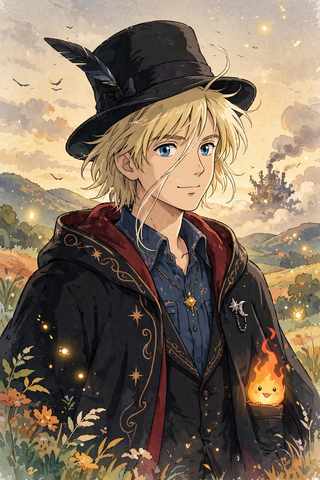
With this prompt, you will appear in a scene of as a flamboyant wizard on a windswept cliff with a walking castle lumbering behind. Imagine a patchwork walking castle glowing softly behind you, swirling dramatic clouds adding depth to the frame, and blue magical flames finishing the composition — all while your own face, expression, and identity remain perfectly recognizable. It is you, but as the hero of your own anime story.
Keep reading for the exact copy-paste prompt, a breakdown of why it produces such stunning results, simple usage steps for any AI tool, pro tips for flawless generations, and answers to common questions. Let us create something whimsical and dramatic together.
The Prompt
Copy the exact prompt below and paste it into your favorite AI image generator along with your photo:
Transform this photo into a Studio Ghibli style anime portrait, keeping the exact face, expression and identity of the person. Place the subject in a scene of as a flamboyant wizard on a windswept cliff with a walking castle lumbering behind, surrounded by a patchwork walking castle, swirling dramatic clouds, and blue magical flames. Hand-painted anime look with soft watercolor shading, delicate line art, vibrant yet gentle colors, dreamy lighting and a richly detailed background. Portrait orientation, high detail, 4k anime illustration.
Why This Prompt Works
Think of this prompt as a director’s brief for a tiny animated film starring you. It starts with the genre — Studio Ghibli style — which instantly sets the palette: gentle watercolors, soft light, and backgrounds with the studio’s trademark richness. The AI knows exactly which aesthetic to channel.
The brief then casts you as the lead with one firm rule: your face must stay yours. “Keeping the exact face, expression and identity” is the line that turns a novelty filter into a personal portrait. It is the reason this prompt works for profile pictures, gifts, and prints — because it is still recognizably you.
The set design follows: a patchwork walking castle, swirling dramatic clouds, and blue magical flames build the Howl’s Moving Castle wizard scene around you. Ghibli backgrounds are famous for rewarding a second look — tiny flowers, drifting clouds, glowing windows — and giving the AI specific elements to paint produces that same layered, whimsical and dramatic depth.
Finally, the prompt calls “action” on quality: portrait orientation for that classic poster feel, high detail, and dreamy lighting. These last words polish the render into something you will be proud to share — warm, vivid, and unmistakably Ghibli.
How to Use This Prompt
Using this prompt could not be simpler. It works with Midjourney, DALL-E, Gemini, Stable Diffusion, Leonardo AI, and virtually every modern AI image generator. Follow these six steps:
- Choose your photo. Pick a clear, front-facing picture with good lighting and a simple background. The AI preserves identity best when it can see your face clearly — avoid heavy filters, sunglasses, or extreme angles.
- Open your AI image tool. This prompt works in Midjourney, ChatGPT with DALL-E, Google Gemini, Leonardo AI, or any image generator that accepts an uploaded reference photo plus a text prompt.
- Copy the prompt. Scroll up to the box under ‘The Prompt’ and copy the entire text exactly as written — every detail about the Howl’s Moving Castle wizard scene matters, from a patchwork walking castle to blue magical flames.
- Upload and paste. Upload your chosen photo to the tool, then paste the prompt into the prompt field. If your tool has a face-match or image-strength setting, set it to favor the reference photo.
- Generate and review. Hit generate and wait a few seconds. Check that your face still looks like you and that the a patchwork walking castle and swirling dramatic clouds details came through beautifully.
- Refine and share. If anything looks off, regenerate or tweak one detail at a time. When you love it, download the highest resolution available and share your whimsical and dramatic Ghibli portrait with the world.
Pro Tips for Best Results
These small refinements separate an okay result from a jaw-dropping one:
- Avoid sunglasses and hats in the source photo. Anything covering your face makes identity preservation much harder for the AI.
- Use the result as a profile picture first. Ghibli portraits make fantastic avatars because they are warm, distinctive, and instantly eye-catching.
- Keep the prompt text unchanged on your first try. Once you see a result you like, then experiment with swapping scene details.
- Face the camera directly. Front-facing photos give the model the clearest map of your features, which means a more recognizable final portrait.
- Mention portrait orientation in your tool’s settings too. Some generators default to square, so double-check the aspect ratio before generating.
- If the scene feels too busy, remove blue magical flames from the prompt and regenerate for a calmer, cleaner composition.
Frequently Asked Questions
Can I use this for someone else’s photo?
Yes, with their permission. The prompt works on any clear portrait — wonderful for surprising friends and family with a whimsical and dramatic Ghibli-style gift. Always respect privacy and get consent before transforming or posting someone else’s picture.
What photo orientation should I upload?
Portrait (vertical) photos work best since the prompt requests portrait orientation output. A vertical selfie gives the AI the ideal canvas for the Howl’s Moving Castle wizard composition, with room for the detailed background above and around you.
Can I sell prints of my Ghibli portrait?
Your own transformed photo is generally fine for personal prints and gifts. Commercial use depends on your AI tool’s terms of service, so check the license of the generator you used. The prompt itself is free for you to use and share.
Will this prompt really keep my face looking like me?
Yes — that is the prompt’s core strength. The explicit identity-preservation instruction tells the AI to anchor the portrait to your real facial features. For best results use a clear, front-facing, well-lit photo, and most generators will return a portrait your friends recognize immediately.
From a simple selfie to a whimsical and dramatic work of art — that is the journey this prompt takes you on in under a minute. Save the prompt, try it with different photos, and gift a few portraits to people you love. The Ghibli feeling is best when it is shared.
Related Viral Prompts
Love this style? Try these next:
- Kiki’s Delivery Service Witch AI Photo Prompt — turn your photo into a dreamy Kiki’s Delivery Service witch scene.
- Ponyo Ocean Wave Girl AI Photo Prompt — turn your photo into a dreamy Ponyo ocean wave girl scene.
- Princess Mononoke Forest Guardian AI Photo Prompt — turn your photo into a dreamy Princess Mononoke forest guardian scene.
#GhibliAI #AIPhotoPrompt #StudioGhibli #Howls #PromptBazar




Leave a Reply