
Introduction
Studio Ghibli did not just make movies; it created a feeling. Fans call it the “Ghibli feeling” — that mix of nostalgia, wonder, and calm you get from a sunlit meadow or a rainy train window in their films. That feeling is now one of the most requested AI photo styles on the internet, and this prompt captures it perfectly.
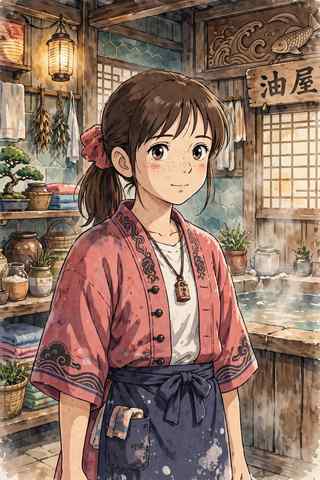
Picture this: as a brave girl stepping onto the crimson bridge of a lantern-lit bathhouse of spirits, rendered in soft hand-painted anime style with glowing paper lanterns, ornate wooden balconies, and swirling warm steam completing the scene. Your face stays true to life while everything around you becomes a loving tribute to classic anime cinematography — gentle colors, dreamy light, and backgrounds so detailed you could get lost in them.
This complete guide gives you the exact prompt to copy, explains the craft behind it, walks you through using it step by step, shares pro tips from thousands of successful generations, and answers frequently asked questions. Your mysterious and enchanting Ghibli portrait is only a few clicks away.
The Prompt
Copy the exact prompt below and paste it into your favorite AI image generator along with your photo:
Transform this photo into a Studio Ghibli style anime portrait, keeping the exact face, expression and identity of the person. Place the subject in a scene of as a brave girl stepping onto the crimson bridge of a lantern-lit bathhouse of spirits, surrounded by glowing paper lanterns, ornate wooden balconies, and swirling warm steam. Hand-painted anime look with soft watercolor shading, delicate line art, vibrant yet gentle colors, dreamy lighting and a richly detailed background. Portrait orientation, high detail, 4k anime illustration.
Why This Prompt Works
Every word in this prompt earns its place. It opens by declaring the transformation — “transform this photo into a Studio Ghibli style anime portrait” — which gives the AI both the source (your photo) and the destination style in one clear instruction. Clear instructions are the foundation of every great generation.
Then comes the identity lock: “keeping the exact face, expression and identity of the person.” AI image models are eager to beautify and genericize, so this explicit constraint matters enormously. It tells the model that resemblance is the top priority, and the results prove it — friends recognize you instantly.
Next, the prompt directs the scenery with glowing paper lanterns, ornate wooden balconies, and swirling warm steam. These are not random decorations; they are signature elements of the Spirited Away bathhouse girl world. Detailed scene direction is what separates a forgettable AI image from one that makes people stop scrolling and ask how you made it.
It closes with craft and format: “hand-painted anime look,” “dreamy lighting,” “portrait orientation, high detail.” This combination of artistic direction and technical specification is why the outputs feel mysterious and enchanting and cinematic instead of flat — like a genuine film still.
How to Use This Prompt
Using this prompt could not be simpler. It works with Midjourney, DALL-E, Gemini, Stable Diffusion, Leonardo AI, and virtually every modern AI image generator. Follow these six steps:
- Choose your photo. Pick a clear, front-facing picture with good lighting and a simple background. The AI preserves identity best when it can see your face clearly — avoid heavy filters, sunglasses, or extreme angles.
- Open your AI image tool. This prompt works in Midjourney, ChatGPT with DALL-E, Google Gemini, Leonardo AI, or any image generator that accepts an uploaded reference photo plus a text prompt.
- Copy the prompt. Scroll up to the box under ‘The Prompt’ and copy the entire text exactly as written — every detail about the Spirited Away bathhouse girl scene matters, from glowing paper lanterns to swirling warm steam.
- Upload and paste. Upload your chosen photo to the tool, then paste the prompt into the prompt field. If your tool has a face-match or image-strength setting, set it to favor the reference photo.
- Generate and review. Hit generate and wait a few seconds. Check that your face still looks like you and that the glowing paper lanterns and ornate wooden balconies details came through beautifully.
- Refine and share. If anything looks off, regenerate or tweak one detail at a time. When you love it, download the highest resolution available and share your mysterious and enchanting Ghibli portrait with the world.
Pro Tips for Best Results
These small refinements separate an okay result from a jaw-dropping one:
- Mention portrait orientation in your tool’s settings too. Some generators default to square, so double-check the aspect ratio before generating.
- If the scene feels too busy, remove swirling warm steam from the prompt and regenerate for a calmer, cleaner composition.
- Print your favorite. These portraits look stunning as small art prints — the mysterious and enchanting palette was practically made for paper.
- Golden-hour selfies work beautifully. Warm natural light in your source photo blends perfectly with Ghibli’s glowing skies.
- Keep the background of your photo simple. A plain wall behind you lets the AI focus on your face and freely paint the Spirited Away bathhouse girl scenery.
- Try a gentle smile or a neutral expression. Natural expressions translate most faithfully into the soft Ghibli art style.
Frequently Asked Questions
Is the prompt free to use?
Completely free. Copy it, use it as many times as you like, and share your creations anywhere. The only possible cost is whatever your chosen AI image tool charges for generations — many offer free tiers that are plenty for this.
Can I change the background scene?
Absolutely. The glowing paper lanterns, ornate wooden balconies, and swirling warm steam details are swappable. Keep the style and identity lines untouched, and replace the scenery with anything you imagine — a beach, a city street, a snowy mountain — while staying in the Ghibli aesthetic.
How long does generation take?
Usually under a minute. Most modern tools return the Ghibli portrait in 10 to 60 seconds depending on the model and server load. Copying the prompt and uploading your photo takes longer than the actual generation.
My face looks slightly off — how do I fix it?
First, try a clearer source photo with even lighting. Second, regenerate — each run varies. Third, raise your tool’s face-fidelity or image-strength setting so the model clings closer to your reference. One of these three fixes solves the issue in nearly every case.
Studio Ghibli taught us that wonder hides in ordinary days — a bus stop in the rain, bread cooling on a rack, wind moving through grass. This prompt lets you live inside that wonder. Create your Spirited Away bathhouse girl portrait now, share it proudly, and keep exploring the styles waiting for you here.
Related Viral Prompts
Love this style? Try these next:
- Howl’s Moving Castle Wizard AI Photo Prompt — turn your photo into a dreamy Howl’s Moving Castle wizard scene.
- Kiki’s Delivery Service Witch AI Photo Prompt — turn your photo into a dreamy Kiki’s Delivery Service witch scene.
- Ponyo Ocean Wave Girl AI Photo Prompt — turn your photo into a dreamy Ponyo ocean wave girl scene.
#GhibliAI #AIPhotoPrompt #StudioGhibli #Spirited #PromptBazar




Leave a Reply