
Introduction
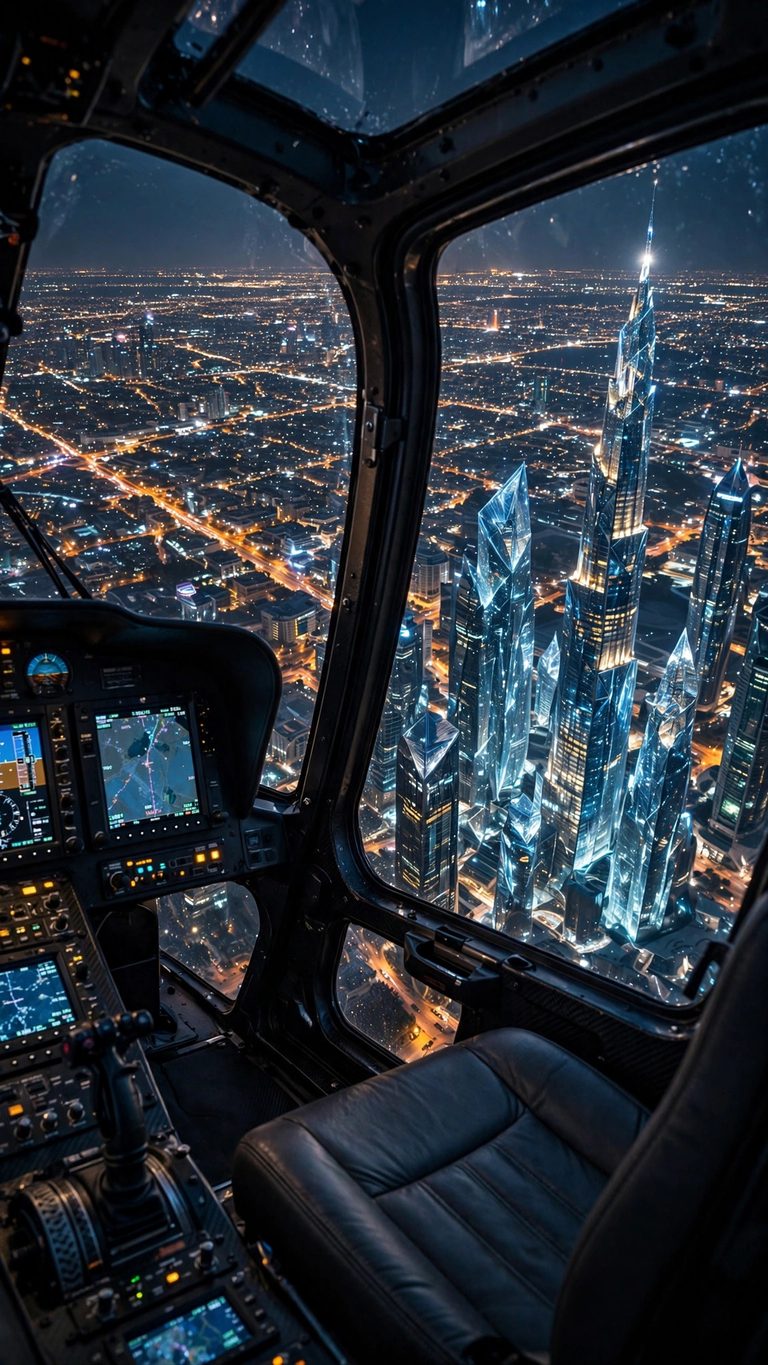
A helicopter over a glittering city at night is the ultimate VIP perspective — the view that money literally buys. It appears in music videos, billionaire documentaries, and luxury brand films because nothing communicates arrival quite like looking down at a sea of lights from above. This prompt puts that exact view in your pocket. It describes a thrilling helicopter ride with the camera looking past the cockpit at endless lights below, skyscrapers rising like crystal towers, the aircraft banking gently around a landmark tower, rotor blur at the frame edges. It is exclusive, cinematic, and engineered for awe. Travel pages, luxury brands, and city showcase accounts fight for helicopter footage because it makes any city look magnificent. With this prompt, you generate it in flawless 8K — no helicopter, no pilot, no five-figure charter fee.
City showcase content has a built-in distribution advantage: civic pride. People share beautiful views of their city the way they share team victories. It is identity content. A helicopter night tour supercharges that instinct because most residents have never seen their own city from this angle; you are giving them a first-time experience of a familiar place. That novelty-plus-pride combination is why city aerials routinely outperform generic travel content. This prompt delivers the most dramatic version, night, banking turn, cockpit immersion, in the vertical format that city pages need. For tourism boards, real estate, and local creators, it is a flagship asset.
The Prompt
Copy the exact prompt below and paste it into your favorite AI video generator:
Thrilling helicopter ride over a glittering city at night, camera looking past the cockpit at endless lights below, skyscrapers rising like crystal towers, the helicopter banking gently around a landmark tower, rotor blur at frame edges, exclusive VIP perspective, ultra realistic, cinematic, 8k
Why This Prompt Works
The cockpit-framed perspective is what elevates this beyond generic aerial footage. By placing the viewer inside the helicopter — looking past the cockpit — the prompt creates first-person immersion rather than detached observation. Viewers do not watch the city; they fly over it. That distinction is the difference between a nice clip and a viral one. The banking turn around a landmark tower provides the clip’s narrative spine: a curved, dynamic move with a clear focal point, far more engaging than straight-line flight. Rotor blur at the frame edges is a brilliant authenticity detail — it sells the illusion of being inside a real aircraft and adds peripheral motion that increases immersion. Skyscrapers rising like crystal towers gives the AI a vivid visual metaphor that produces those glittering, faceted building renders night cities are famous for. Endless lights below ensures the frame stays rich with detail from edge to edge — no dead space, which is critical for retention. The exclusive VIP perspective direction sets the emotional register: this is not transportation, it is privilege. Night is the ideal setting because city lights do the heavy lifting for beauty, and AI models render night illumination spectacularly. Eight vertical seconds of this feels like a trailer for the good life.
How to Use This Prompt
Copy the full prompt with style tags. In Veo 3, paste into text-to-video with 9:16 vertical and 8 seconds — its night city rendering is outstanding. In Runway, the latest model handles the banking turn smoothly. In Kling, high-quality mode keeps the skyline crisp. In Pika, enable the cinematic preset for rich night tones. In Sora, the city lights will look spectacular. Generate two or three takes and pick the one with the most natural cockpit framing — AI sometimes distorts cockpit edges, so choose the cleanest. Download and post with epic or luxurious audio: cinematic orchestral, trending VIP sounds, or city-night lo-fi. On-screen text like the city that never sleeps, from above performs well. For city-specific pages, name the city in your caption — the prompt works for any metropolis, so localize it: replace landmark tower with a named landmark like the Burj Khalifa or Eiffel Tower for instant relevance. Total time: about five minutes from prompt to post.
Pro Tips & Creative Variations
Sky-high variations abound. Change the city: specify Manhattan, Dubai Marina, Hong Kong harbor, or the London Eye for instantly recognizable content that local audiences share. Change the time: a sunset helicopter ride with golden light is romantic and fresh, while a dawn flight with morning mist is serene. Change the aircraft: a seaplane landing on water, a hot air balloon over a city, or a drone-style free flight without the cockpit frame for pure aerial beauty. For narrative, pair this night tour with a daytime version — same city, two moods — and post as a series. If the cockpit looks wrong, remove the cockpit frame entirely and go full aerial; the banking turn still carries the clip. Add searchlights sweeping or fireworks below for event-night drama. For the ultimate hook, start your edit with the darkest frame and let the city ignite as the helicopter banks — a light-reveal moment viewers rewatch. This prompt also works beautifully for real estate: overlay text about penthouse views and you have a luxury listing ad.
Localize aggressively: generate versions for every major city your audience cares about and tag local hashtags. City-specific posts get shared in local groups and pages, multiplying reach. Create a day-night pair for the same city and post them as a carousel or duet; the contrast is striking. For real estate, add text overlays about specific neighborhoods as the helicopter banks past them. That is hyperlocal luxury marketing. If the cockpit frame causes artifacts, drop it and go pure aerial; the banking turn carries the drama alone. Try the landmark reveal: start tight on darkness, then bank to unveil an illuminated landmark. The reveal moment is pure retention gold. For an advanced edit, stabilize the clip and add a subtle speed ramp through the turn. And remember: name the city in your caption and first comment for searchability.
Frequently Asked Questions
Can I specify a real city? Yes — add the city or landmark name to the prompt. AI handles famous skylines reasonably well, though details will be impressionistic rather than exact.
Why include the cockpit frame? It creates first-person immersion, which dramatically increases engagement versus detached drone shots. If it renders poorly, drop it.
Which tool is best for night cities? Veo 3 and Sora lead. If lights look blurry, add sharp city lights, clear night to the prompt.
How do I make it feel faster? Add slight forward speed sensation or increase motion via your editor’s speed ramp. The banking turn already implies motion.
Will viewers recognize it is AI and not real footage? At 8K with good generation, most will not notice, and engagement data shows they do not mind. Focus on the feeling of the view. If you run a news or documentary page, disclose AI use; for lifestyle and luxury pages, it is standard practice.
Endless lights, crystal towers, the city at your feet — this prompt is the VIP perspective, democratized. Copy it, take the tour, and show your audience the view from the top. The city glitters below and the rotors are turning. Generate your tour of the town that never sleeps.
Related Viral Prompts
- Diamond Sparkle Macro AI Video Prompt: Free Dazzling 8K Rotating Jewel Close-Up Clip for Reels & TikTok
- Red Supercar Studio Shot AI Photo Prompt: Free Dramatic 8K Car Photography Prompt for Midjourney & DALL-E
- Yacht Aerial Turquoise AI Photo Prompt: Free Breathtaking 8K Drone Photo Prompt for DALL-E 3 & Midjourney
# A I V i d e o # P r o m p t B a z a r # H e l i c o p t e r # N i g h t C i t y # V I P

Leave a Reply