
Introduction
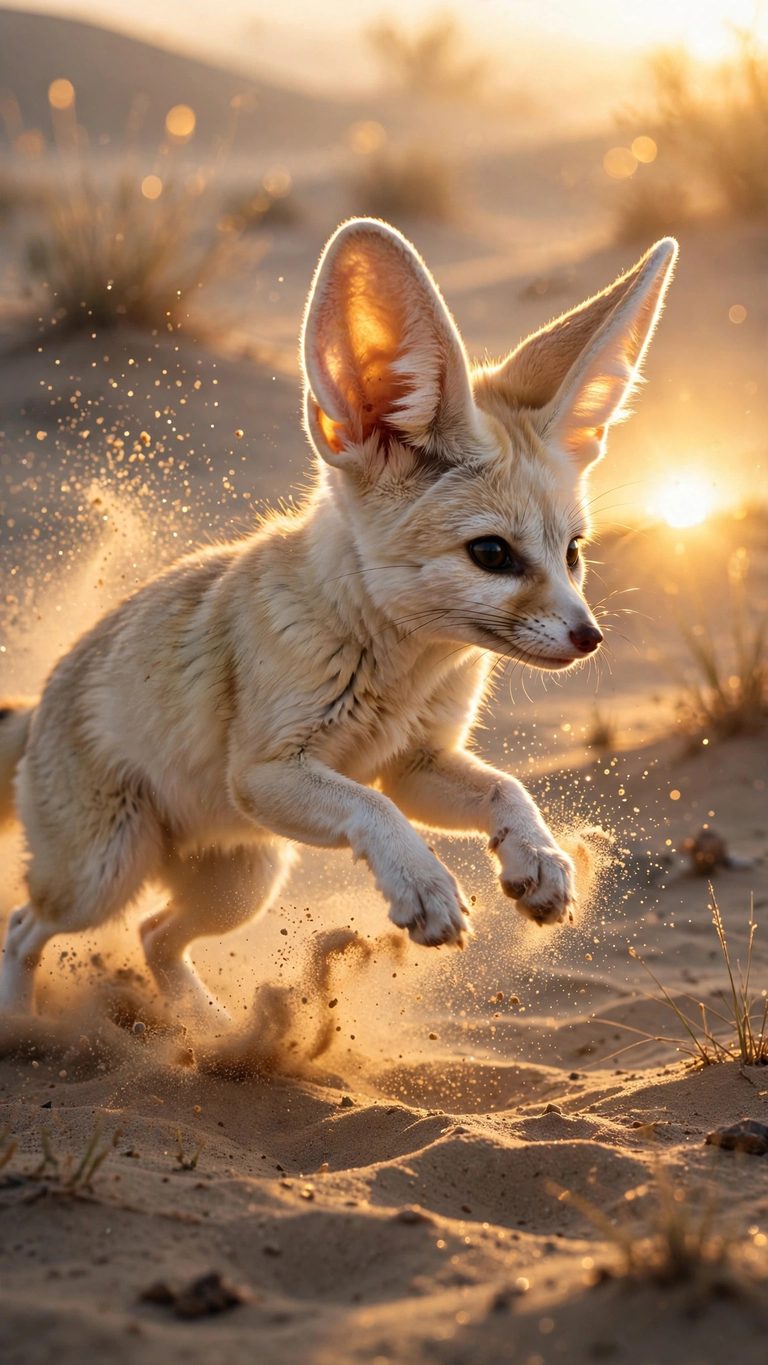
Dawn in the desert arrives softly, and for a few precious minutes the dunes glow like warm honey while the air still holds the cool of night. Imagine a tiny fennec fox standing in that light, its enormous ears rimmed with gold, listening hard to something stirring beneath the sand. Then it springs into the air and lands in a puff of sparkling dust, proud as a hunter who conquered the morning. That heartwarming beat is the entire idea behind this AI video prompt, pure internet gold. Cute animal clips rule short-form video, and fennec foxes sit at the very top of the internet’s favorite creatures list. Their giant ears, bright eyes, and playful pounces make viewers stop scrolling, smile, and share. This prompt packs all of that charm into a single cinematic shot: a fennec fox hunting at dawn, backlit by a golden sunrise, kicking up glittering sand in soft shallow focus. It looks like an 8K nature documentary frame, yet you can generate it in seconds from your phone. Whether you are growing a cute animal page, warming up your content mix, or chasing your first viral hit, this desert dawn moment delivers instant charm in every frame.
The Prompt
Copy the exact text below into your favorite AI video generator. Every word is tuned for cuteness, golden light, and cinematic realism:
Adorable cinematic shot of a fennec fox with giant ears hunting at dawn in the desert, pouncing playfully into soft sand, huge ears backlit by golden sunrise, tiny paws kicking up sparkling dust, shallow depth of field, heartwarming wildlife moment, ultra realistic, 8k nature film
Why This Prompt Works
This prompt works because it stacks three of the most powerful viral triggers in online video, cuteness, beauty, and emotion, into a single frame. Scientists call it the baby schema effect: large eyes, round faces, and oversized features like the fennec fox’s giant ears switch on our caregiving instincts within milliseconds. Viewers do not decide to love the clip; their brains do it for them, which is why cute animal videos earn some of the highest save and share rates on TikTok, Instagram Reels, and YouTube Shorts. Then comes the light. Golden hour backlighting is the oldest trick in cinematography because warm, low sun flatters everything it touches, and here it turns the fox’s ears translucent, a detail so striking that people rewatch just to catch it again. The shallow depth of field keeps the fox razor sharp while the desert melts into a creamy blur, which reads as premium and expensive even on a small phone screen. The sparkling dust kicked up by tiny paws adds motion texture that holds attention through the full eight seconds and defeats the dreaded swipe-away. Wildlife content also travels across language barriers, so one clip can perform in the US, Europe, and Asia at the same time. Hashtag communities like #FennecFox and #Wildlife give the video an instant home, while the nature-documentary aesthetic borrows trust from the world’s best wildlife filmmaking. Put together, the prompt does not just show an animal; it manufactures a feeling, and feelings are what get shared.
How to Use This Prompt
Using this prompt is refreshingly simple, and it works across every major AI video platform. Start by setting your canvas to a 9:16 vertical aspect ratio, the native shape of TikTok, Reels, and Shorts, because a horizontal clip letterboxed on a phone screen loses half of its emotional impact. In Veo 3, paste the full prompt and choose a cinematic or photoreal style preset if one is available, then generate two or three variations and keep the one where the ear backlighting looks strongest. In Runway, the same text works well with a subtle camera push-in for extra life; keep motion settings moderate so the fox stays anatomically correct. Kling handles animal motion beautifully, so let it run the full eight seconds and watch the physics of the paws and ears. In Pika, add a negative prompt such as cartoon, blurry, or extra limbs to protect realism. Sora users can append a short camera note like slow dolly forward for a gentle cinematic move. Render at the highest resolution your plan allows, download the clip, and layer a soft natural soundscape of desert wind before posting. Always preview on your phone rather than your desktop, because that is where your audience will meet the fox.
Pro Tips & Creative Variations
Once the base clip works, the real fun begins with variations. Try a moonlit version by swapping dawn for a full moon and silver-blue tones; night hunts feel mysterious and perform well as a companion series to the sunrise original. Ask for an extreme close-up of just the ears swiveling like radar dishes, a macro detail shot that animal lovers cannot resist. Emphasize slow motion in tools that support it to stretch the pounce into a graceful floating arc. Change the prey for a punchline: a tiny desert beetle or a lizard tail flicking out of frame gives the hunt a tiny story. For a bigger narrative, generate three clips, the stalk, the pounce, and the proud trot away, then stitch them into a mini story that can triple watch time. Seasonal twists work too: a dust storm rolling in behind the fox adds drama, while a rare desert bloom in the foreground adds color contrast. Sound design matters enormously, so layer soft wind, faint paw scuffs, and a warm acoustic guitar pluck to make the clip feel like a real film. Caption hooks such as POV: you are the reason the desert woke up smiling drive comments. Post in the early morning across US time zones when cute content earns its best engagement, and pin your best-performing version to your profile so new visitors meet the fox first.
Frequently Asked Questions
Which AI video tool gives the best results for cute animals?
Veo 3 and Kling currently lead for realistic animal fur and motion, because they handle fine detail like whiskers and ear translucency especially well. Runway is excellent for camera control, while Pika is fastest for quick experiments. Try the same prompt in two tools and keep the winner, since results vary between versions.
Why does the prompt specify a 9:16 aspect ratio?
TikTok, Instagram Reels, and YouTube Shorts all display vertical video full screen. A 9:16 clip fills the phone, which maximizes the emotional impact of the fox’s face and earns longer watch time than a cropped horizontal video ever could.
How do I stop the fox from looking cartoonish?
Keep the phrases ultra realistic and 8k nature film in the prompt, and add negative prompts like cartoon, illustration, or 3d render where the tool allows them. If ears or paws warp, regenerate instead of accepting flaws; animals reveal AI artifacts faster than landscapes do.
Can I use this video commercially?
Most AI video platforms grant commercial rights on paid plans, but the terms differ, so check your specific plan before using the clip in ads or client work. For organic social posts you are generally fine, and adding your own edit and sound strengthens your ownership of the final piece.
Some prompts chase trends, but this one chases a feeling, the small warm rush of watching something adorable conquer its tiny world at sunrise. Generate the clip, post it in 9:16, and let the fennec fox do what it does best: melt hearts and rack up shares. Try the prompt today and watch your wildlife content come alive.
Related Viral Prompts
- Bedouin Mint Tea Ceremony AI Video Prompt: Warm Golden Evening Culture for Aesthetic Travel Reels Shorts
- Hypnotic Desert Dunes AI Video Prompt: Aerial Drone Wave Patterns for Oddly Satisfying Viral Reels Clips
- Desert Campfire Night AI Video Prompt: Cozy Starry Storytelling Scene for Warm Community Reels Videos
# A I V i d e o # P r o m p t B a z a r # F e n n e c F o x # C u t e # W i l d l i f e



Leave a Reply