
Introduction
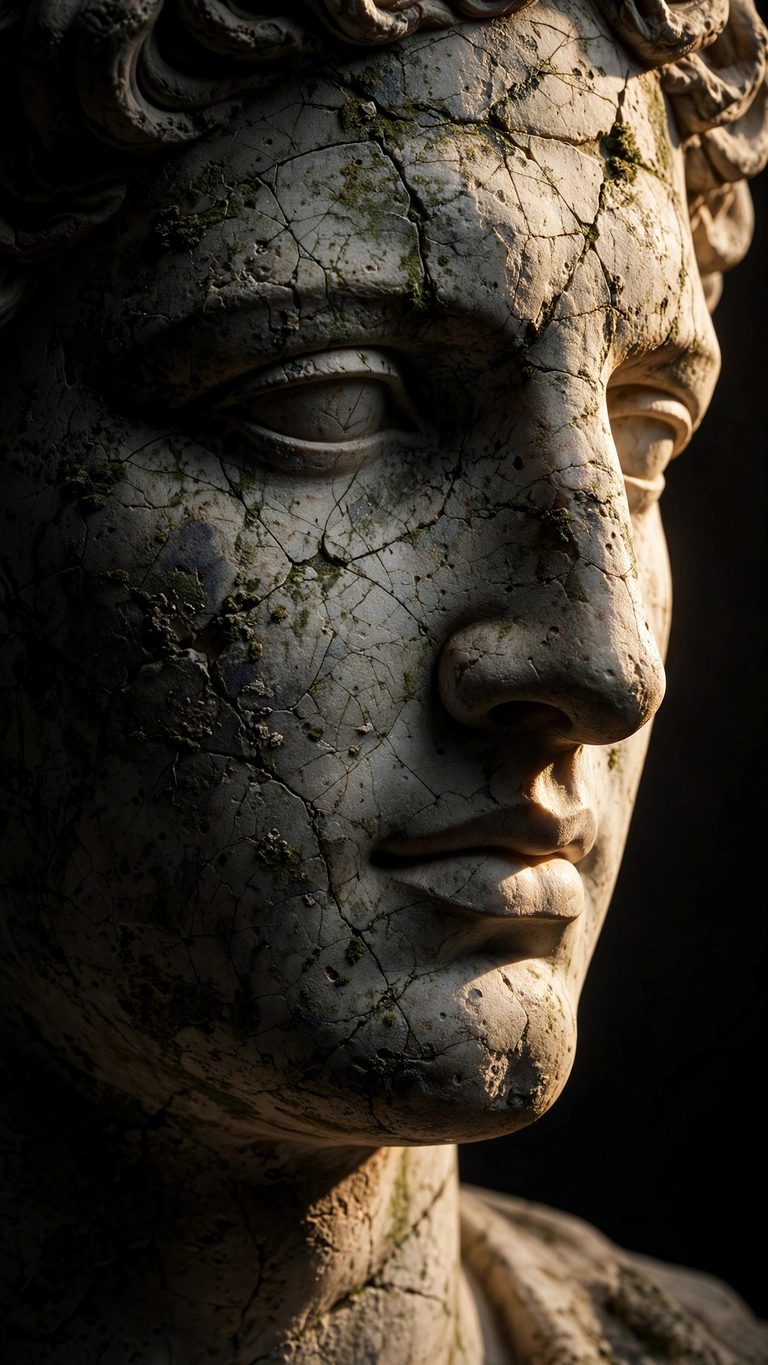
There is a moment every museum visitor knows: you turn a corner in a quiet gallery, and a two-thousand-year-old face is looking back at you. It is not a photograph. It is marble, cut by hands that turned to dust twenty centuries ago, and yet the expression is so calm, so alert, that you feel noticed. That quiet shock is the power of a Greek marble close-up. The cracked patina tells you that time has passed. The serene mouth tells you it never mattered.
In an endless feed, images like this are a full stop. They do not shout for attention; they hold it. Classical sculpture content earns saves, shares, and long dwell time because it delivers beauty, authority, and mystery in a single frame — the exact cocktail that algorithms reward. Modern AI image models have finally learned to render stone, shadow, and human expression with photographic conviction. This prompt compresses that whole museum moment into a few lines of text: a close-up portrait of antiquity itself, lit like a Caravaggio and sharp enough to count the chisel marks. Below is the exact prompt, a breakdown of why every phrase earns its place, and a step-by-step path to gallery-grade results.
The Prompt
Copy the text below exactly as written and paste it into Midjourney, DALL-E 3, Flux, or any photorealistic image model. No editing is needed — it is engineered to work out of the box.
Exquisite close-up photograph of an ancient Greek marble statue face, cracked patina, serene expression, dramatic side lighting sculpting every curve, dark background, timeless classical beauty, hyper-detailed stone texture, ultra sharp, 8k, photorealistic
Why This Prompt Works
Every phrase in this prompt is doing deliberate work, and understanding the machinery is what lets you adapt it later. “Close-up photograph” sets the framing: intimacy. Left to their own devices, image models default to medium-wide establishing shots, so naming the close-up forces the model to spend its detail budget on the face — pores of stone, cracks, the edge of a lip — instead of wasting it on a forgettable background.
“Cracked patina” is the authenticity signal. It tells the model this is not a modern garden-center replica but an artifact that has survived millennia. Patina is also something AI renders beautifully: fine, irregular surface variation is exactly the kind of texture diffusion models excel at, and it instantly separates convincing results from the dreaded smooth-plastic look.
“Serene expression” provides the emotional anchor. Calm faces earn saves because viewers project their own mood onto them, and serenity also steers the model away from the grotesque — without it, close-up ancient faces can drift toward horror. Paired against “dramatic side lighting sculpting every curve,” you get classical chiaroscuro: raking light that reveals form the way museum spotlights do, carving cheekbones and brow ridges out of shadow. Flat, frontal lighting is the number one cause of dull AI sculpture renders; this phrase prevents it.
“Dark background” is a quiet masterstroke. It creates the gallery-spotlight effect, isolates the subject, and — just as importantly — gives the model nowhere to hallucinate: no crowds, no gift shop, no warped architecture. Fewer background pixels means fewer artifacts. Finally, the quality stack — “hyper-detailed stone texture, ultra sharp, 8k, photorealistic” — is intentional redundancy. Each token nudges the model toward fidelity from a slightly different angle, and together they suppress the painterly drift that weaker prompts allow. “Timeless classical beauty” is the semantic guardrail, steering output toward the idealized Greek canon rather than cartoonish or uncanny territory.
How to Use This Prompt
You can run this prompt on any major image generator in under five minutes. Pick your platform and follow the matching path below.
- Copy the prompt exactly. Select the full text from the box above, including the quality terms at the end. Do not paraphrase on your first run — you want a clean baseline.
- Midjourney (recommended for texture): Type /imagine, paste the prompt, then append –ar 9:16 –v 7 –style raw. The raw style keeps the render photographically honest instead of beautified. Generate four options, pick the strongest face, and hit U1–U4 followed by Upscale (Subtle).
- DALL-E 3 (via ChatGPT): Paste the prompt and add “portrait orientation, 9:16 aspect ratio” in the same message. If the first result looks too smooth, reply with “increase stone texture detail, add fine cracks and pitting.”
- Flux (via Fal, Replicate, or local install): Paste the prompt, set the aspect ratio to 9:16 (768×1344 works well), use 40–50 steps with guidance around 3.5. Flux is exceptional at micro-texture on stone.
- Iterate with single-variable changes. Keep the prompt constant and change one element per generation — a different deity, a three-quarter view, rain-wet marble — so you learn what each change does.
- Finish and publish. Export at full resolution, apply light retouching (a touch of contrast and clarity goes a long way), and post with a caption about the statue plus niche hashtags like #ClassicalArt and #AncientGreece.
Pro Tips & Creative Variations
Once the base prompt works, the real fun is remixing it. The lighting recipe here — dramatic side light on a dark background — transfers beautifully to almost any classical subject. Swap the Greek face for Athena in a crested helmet, a weathered Roman emperor, or a sphinx half-buried in desert sand, and the prompt still sings. Change the material for fresh texture studies: Pentelic marble with golden veins, rain-slicked marble glistening under the light, or an outdoor statue flecked with moss and lichen.
Lighting variations are the fastest way to multiply your content. Try candlelight flicker for a tomb-discovery mood, cold moonlight for something ghostly, or a hard museum spotlight from directly above for maximum drama. For context variations, place the statue in a flooded ruin with reflections, in a stark modern white gallery for contrast, or emerging from excavation dust with an archaeologist’s brush in frame — narrative context dramatically increases share rate.
If you work in Stable Diffusion or Flux workflows, add a negative prompt: “cartoon, 3d render, smooth plastic skin, modern, watermark, deformed face, extra fingers.” This single line eliminates most failure modes. Build a series — “Faces of Antiquity,” one statue per post with the same prompt skeleton — because carousels and series earn far more saves than one-offs, and followers return for the next face. Finally, for print or wallpaper use, run your best result through an AI upscaler like Topaz Gigapixel; the chisel-mark detail this prompt generates holds up remarkably well at large sizes.
Frequently Asked Questions
Q: Which generator produces the most realistic marble?
A: Midjourney v7 and Flux currently lead for stone texture, with DALL-E 3 close behind but slightly softer. If your priority is hyper-detailed surface — every pit and crack — start with Midjourney using –style raw.
Q: My statue looks like smooth plastic. How do I fix it?
A: Strengthen the texture language: add “pitted stone, visible chisel marks, lichen spots, weathered edges.” Avoid the word “beautiful” on its own, which models interpret as smoothing. The raw style in Midjourney also helps enormously.
Q: Can I use these images commercially?
A: On most paid tiers of Midjourney, DALL-E, and Flux-based services, you own the commercial rights to images you generate — but terms change, so check the current ToS of your platform. One caution: do not present the image as a photograph of a real artifact; label AI-assisted work honestly.
Q: How do I keep the 9:16 portrait ratio?
A: In Midjourney append –ar 9:16. In DALL-E 3, state “portrait orientation, 9:16” explicitly. In Flux interfaces, set custom dimensions such as 768×1344 before generating.
A close-up of ancient marble is proof that beauty outlives its makers. With this prompt you can summon that timeless gaze on demand — for content, for art, or for the simple pleasure of looking. Copy it, run it, and let two thousand years of calm do the talking.
Related Viral Prompts
- Terracotta Army Warriors: Epic AI Photo Prompt for Breathtaking Ancient Chinese Clay Army Scale Shots | PromptBazar
- Ancient Gold Coins Treasure Macro: Gleaming AI Photo Prompt for Luxurious Vintage Wealth Still Images | PromptBazar
- Stonehenge Under Milky Way: Mystical AI Photo Prompt for Stunning Ancient Night Sky Wonder Images | PromptBazar
# A I P h o t o # P r o m p t B a z a r # M a r b l e S t a t u e # G r e e c e # C l a s s i c a l

Leave a Reply