
Introduction
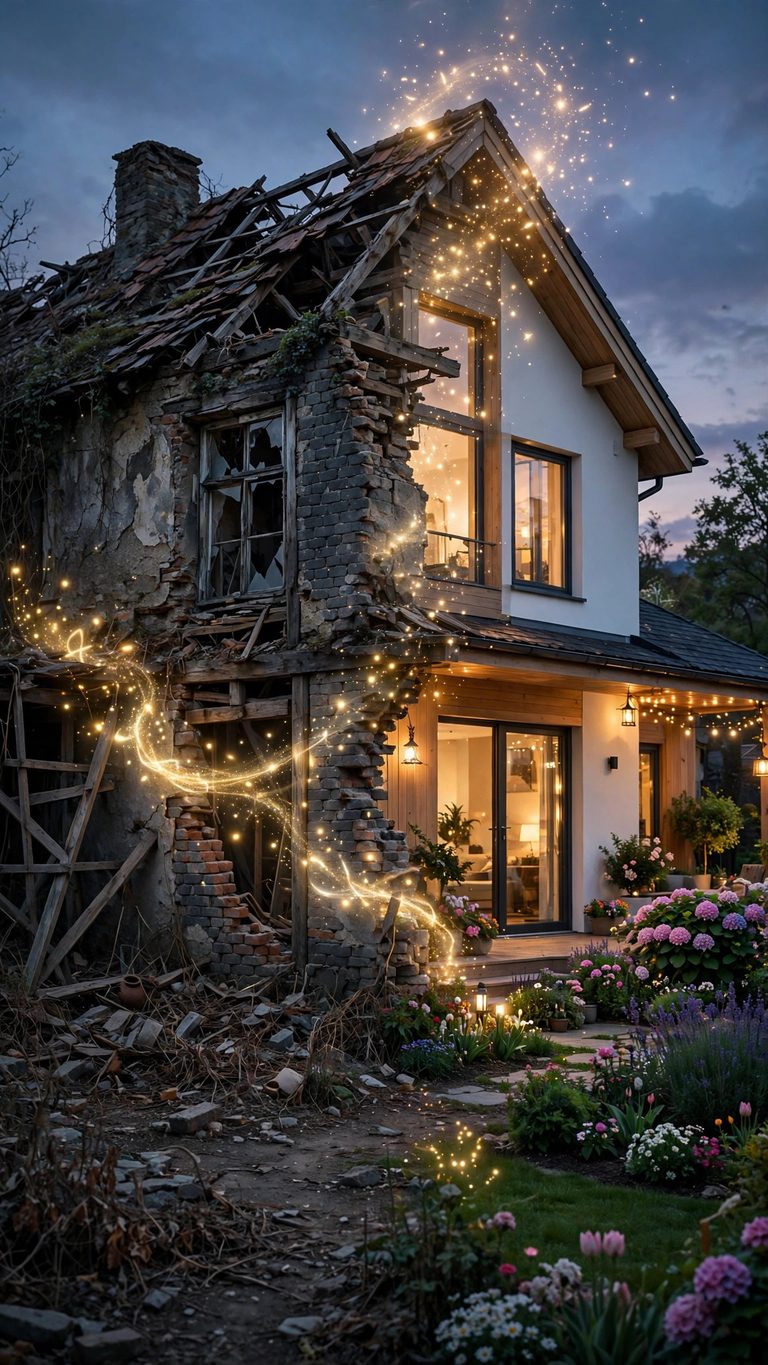
There is a reason renovation videos never leave your feed. The human brain is wired to love visible progress — psychologists call it the completion principle — and nothing triggers it harder than watching a crumbling, forgotten house stitch itself back together in ten seconds flat. This AI video prompt captures that exact magic: a ruined old house, paint peeling and garden overgrown, transforming into a beautiful modern home as walls rebuild, fresh paint rolls on, and flowers bloom in fast-forward.
What makes this concept so powerful for creators is that it borrows the emotional engine of an entire television genre. Home makeover shows have dominated ratings for two decades because the before-and-after arc delivers a dopamine hit no other format can match. Until recently, filming a real renovation took months of cameras, crews, and construction budgets. With AI video generators like Veo 3, Kling, and Runway, you can now produce a jaw-dropping transformation timelapse in under a minute — no crew, no site, no budget. Whether you run a real estate page, a DIY account, or just want a reel that stops thumbs mid-scroll, this prompt is your shortcut to the most satisfying genre on the internet.
The Prompt
Copy the exact prompt below and paste it into your favorite AI video generator:
Satisfying timelapse transformation of a ruined old house into a beautiful modern home, walls rebuilding, paint appearing, garden blooming, day turning to night with warm lights on, before-after magic, ultra realistic
Why This Prompt Works
This prompt performs so well because three forces work together: contrast, completion, and aspiration. First, contrast. The opening frame — a dilapidated house with broken windows and dead landscaping — sets a low visual baseline, so every second after that is pure upward motion. Researchers who study visual attention have found that high-contrast transformations hold gaze longer than static beauty shots, because the brain keeps comparing “before” against “after” in real time. Your viewers literally cannot look away until the payoff lands.
Second, completion. Timelapse transformations exploit the same psychology as progress bars. Once a viewer watches the first wall rebuild, an itch forms: they need to see it finished. That itch is retention, and retention is the currency that Reels, Shorts, and TikTok algorithms trade in. A ten-second video with ninety percent average watch time will outrank a sixty-second vlog every single time, which is why renovation timelapses punch far above their weight.
Third, aspiration. A beautiful modern home with warm lights glowing at dusk is not just pretty — it is a dream your audience already owns. Renovation content lets people project themselves into a better version of their life, and that emotional projection is what converts a view into a share, a save, or a follow. Add the day-to-night lighting shift written into this prompt, and you get a cinematic finale that feels like the end of a movie trailer. Few AI prompts pack this much narrative arc into ten seconds.
How to Use This Prompt
Using this prompt is straightforward, but a few choices decide whether your result looks like a Hollywood timelapse or a blurry morph. Start by copying the full prompt text exactly as written — every descriptive clause earns its place. Then pick your generator. For maximum photorealism, Veo 3 and Kling currently lead on architectural transformations; their training data handles straight lines, windows, and rooflines far better than older models. Runway’s Gen-4 gives you more control if you want to art-direct specific moments, while Pika is a solid free option for quick drafts and Sora excels at the cinematic day-to-night finale.
Set your canvas to 9:16 vertical and aim for an 8 to 10 second clip — the native format for Reels, Shorts, and TikTok. If your tool supports image-to-video, consider generating a still of the ruined house first and using it as the opening frame; this anchors the “before” and makes the transformation read more clearly. Generate two or three variations and pick the one where the structure stays coherent — watch for windows that slide or walls that wobble, the classic AI timelapse artifacts. Finally, pair the clip with trending audio: renovation TikTok has its own sound ecosystem, and the right track can double your reach. Export at the highest resolution available and post during evening scroll hours in your audience’s timezone.
Pro Tips & Creative Variations
Once you have the base video, the real growth comes from variations. First, change the architecture: swap “modern home” for a Victorian restoration, a Scandinavian cabin, or a Mediterranean villa to target different design communities — each has a passionate audience waiting to be served. Second, play with seasons. A snow-covered ruin blooming into a spring garden adds a second transformation layer that performs exceptionally well in December and March, when viewers are primed for renewal narratives.
Third, turn one prompt into a series. Post the exterior transformation on Monday, then generate matching interiors — kitchen, living room, backyard — across the week. Series content trains both the algorithm and your audience to expect the next episode, which compounds followers fast. Fourth, add text overlays that create narrative stakes: “POV: you bought the cheapest house on the street” or “Day 1 vs Day 90 of our renovation.” Text gives context to viewers watching on mute, who make up the majority of feed scrollers.
Fifth, experiment with the ending beat. The prompt’s day-to-night shift is strong, but try alternatives: a family walking up the driveway, fireworks over the finished home, or a slow push-in through the front door. Finally, consider the thumbnail. Export the final “after” frame and use it as your cover image — on profile grids, a row of glowing finished homes is irresistible bait for new visitors.
Frequently Asked Questions
Which AI tool gives the best results for this renovation prompt?
Veo 3 and Kling currently produce the most coherent architectural transformations, with stable geometry across frames. Runway Gen-4 is best if you want precise control over pacing, Pika works for quick free drafts, and Sora shines on the cinematic lighting finale.
How do I avoid weird morphing artifacts in the walls and windows?
Generate at the highest resolution, keep the camera move simple, and generate three to four takes. Discard any where rooflines wobble or windows slide — one clean take beats five glitchy ones every time.
Can I start from a photo of a real house?
Yes. Most tools now support image-to-video: upload a photo of a run-down property as your first frame and let the prompt’s transformation play out from there. This is how real estate creators make hyper-local viral content.
Can I monetize videos made with this prompt?
Generally yes for ad revenue and brand deals, but check your generator’s terms — commercial licenses vary between free and paid tiers, and some tools require a paid plan for commercial use.
The old house renovation timelapse is the closest thing AI video has to a guaranteed crowd-pleaser: instant narrative, universal aspiration, and a payoff engineered for replays. Copy the prompt, generate your transformation, and post it tonight — then watch the saves roll in. Your dream-home content era starts with a single ten-second clip.
Related Viral Prompts
- Natural to Glam in Seconds: Makeup Glow-Up Transformation AI Video Prompt for Viral Beauty Reels and TikToks
- Pencil Lines to Photorealism: Sketch-to-Portrait AI Video Prompt That Turns Drawings Into Living Art Online
- Wasteland to Wonderland: Garden Bloom Timelapse AI Video Prompt for Satisfying Eco Transformation Videos
# A I V i d e o # P r o m p t B a z a r # T r a n s f o r m a t i o n # R e n o v a t i o n # B e f o r e A f t e r



Leave a Reply